Why the name leads to two game collections
Radiant Optimizer is Windows software. In a game search, the name can also refer to browser projects shared by its social account. This guide separates those destinations so you can find the next step you actually need.
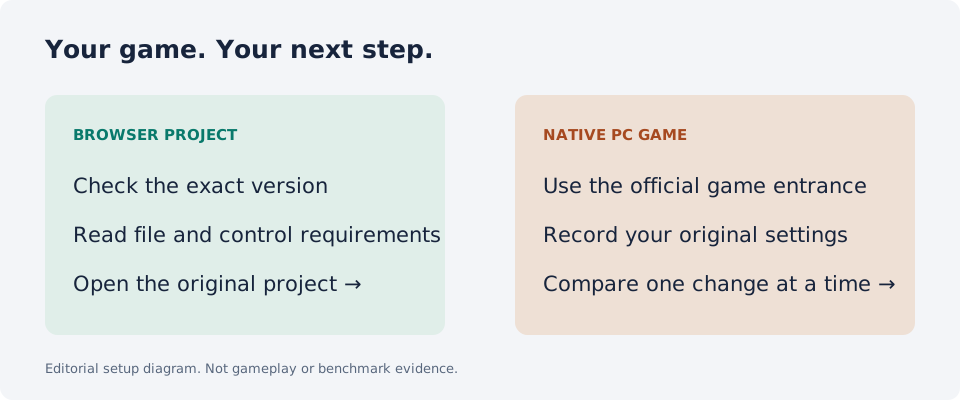
If you remember Quake, Halo, or a Zombies project from a shared post, start with the browser-game directory. If you want a native PC game and information about performance settings, start with the PC guides. These are different uses of the same search phrase.
The Windows software
The current publisher site describes Windows tools, game and application profiles, and diagnostics. It is the source for available features, downloads, and licensing terms. This directory does not distribute an installer or sell the software.
Earlier publisher-indexed material named games such as CS2, VALORANT, Fortnite, Apex Legends, Warzone, and Rust. The live profile page retrieved during our October 10 review had changed to a Warzone checklist. We therefore treat the earlier list as a historical reference, not a verified current support roster. Check the current app for a specific profile.
The browser-game collection
A readable mirror of the Radiant account’s follow-up lists third-party game-project links. Direct access to the X posts was unavailable during research. The directory cross-checks individual project pages instead of assuming every social-post label describes the full original game.
Some destinations document a browser entrance. Others require your own game data or offer only a limited demo. Read each entry’s version and setup notes. Neither a game name nor browser access establishes that all original content is included.
Choose your next step
For a quick browser session, choose an entry tagged Browser entry and inspect the host’s controls. For a project tagged Own game files, read its setup instructions before opening the game. For native PC games, use the official game or store entrance.
If you are investigating low FPS or lag, describe the symptom first and record the original settings. Our performance guide explains a comparison workflow. We have not measured Radiant’s performance or verified full gameplay for the browser collection.
Good questions. Clear answers.
Is Radiant Optimizer itself a game?
Its publisher describes Windows tools and diagnostics. Browser games in the shared collection are separate projects.
Do I need to buy the optimizer to open a browser project?
This directory does not require a purchase. Each project has its own setup and access conditions.
Is this the official Radiant site?
No. Radiant Game Guide is an independent directory and editorial guide.
Did Radiant share every game in this directory?
No. Shared list labels identify entrances from the previously reviewed account mirror. Browser discovery labels identify additional creator-hosted games selected by this directory. They are not claimed to be shared by Radiant or supported by the optimizer.
Sources and review
Source review: . Gameplay and performance are not tested by this directory.